Quick answer
- Batery is licensed in Curaçao: licence number OGL/2024/107/0914, operator YouGMedia B.V. Match both in the site footer before you download anything.
- Izaro News does not host, mirror or modify any Battery Bet APK. The only sensible source is the "Apps" menu on the operator's own site, reached while you are sure you are on the genuine site.
- Reviewers report version 1.7.9, an APK of about 5.54 MB, roughly 11.7 MB once installed, and a requirement of Android 10 or newer. Treat these as reported figures that change with each release.
- Installing it means giving your browser the "Install unknown apps" permission. Switch that permission off again as soon as the app is installed.
- There is no native iPhone app in the App Store. iOS users add the site to the Home Screen from Safari as a web app (PWA), reported to need iOS 13 or newer.
- Fake, "mod" and "hack" APKs shared on Telegram, YouTube and look-alike domains are the main danger. None of them can change game results, and many exist to steal logins or money.
- Online money games are prohibited from being offered in India under the 2025 Act. The app can stop working, and you have no Indian consumer protection if something goes wrong.
- Licence
- Licensed in Curaçao, OGL/2024/107/0914, operator YouGMedia B.V.
- Reported version
- 1.7.9
- APK file size
- About 5.54 MB, about 11.7 MB installed
- Android requirement
- Android 10+, 1 GB RAM, 50 MB free
- iPhone route
- Safari web app, iOS 13+
- Hosted by us
- No file of any kind
What is the Battery Bet app, and what does this page not do?
Battery Bet (Batery) is a sportsbook and casino licensed in Curaçao under number OGL/2024/107/0914. The operator named on the licence is YouGMedia B.V. The brand is spelled Batery, but most people in India type "battery bet apk" or "battery bet app download" into search, so we use both spellings here.
The Battery Bet app is a small Android client for that same account. Reviewers describe it as carrying the sportsbook, live betting, the casino lobby, Aviator, the cashier and 24/7 live chat, in English, Hindi and Bengali. It does not give you a separate account, better odds or different games. The login you use in a browser is the same login the app uses.
Izaro News is an independent guide. We are not the operator, and three limits follow from that:
- We do not host or link to any APK file. A download offered by a third-party page is exactly the pattern that fake APK sites use, so we will not imitate it.
- We have not installed the app ourselves. Everything below about version, size and behaviour comes from public reviews and from how Android and iOS handle this kind of install in general.
- We cannot see or repair your account, your payments or your device.
What we can do is explain the mechanics properly: why the file is not in the Play Store, what Android is actually asking when it shows the "unknown apps" prompt, how to check that the file is what it claims to be, and how to undo everything afterwards.
Why the file size is so small
A reported 5.54 MB download is tiny next to a typical shopping or payments app. The likely explanation is that the client is a thin shell around the operator's web platform. The shell handles login, notifications and the navigation frame, while odds, game lobbies and the games themselves load from the server as you use them.
That design has two practical consequences. The app is light on storage, which helps on budget phones. And it depends on a live connection for almost everything, so a weak network affects it just as much as it affects the mobile site.
Reported Battery Bet APK version, size and requirements
The figures below come from a public review of the app. We have not measured them, and the operator can change any of them with a new build. Use them as a reference point for spotting a file that is clearly wrong, not as a guarantee.
| Item | Reported value | What it means for you |
|---|---|---|
| App version | 1.7.9 | A newer number is normal. A much older number on a third-party site is a reason to distrust that source. |
| APK download size | 5.54 MB | A file several times larger, or only a few hundred KB, does not match public reports and deserves suspicion. |
| Installed size | About 11.7 MB | This grows as the app caches images and data. Clearing cache brings it back down. |
| Android version | Android 10 or newer | Phones on Android 9 or older should use the mobile site instead. |
| Memory | 1 GB RAM | A minimum, not a comfort level. Live casino streams need more headroom. |
| Free storage | 50 MB | Android often refuses installs when storage is nearly full, even for small apps. |
| Where it comes from | The "Apps" menu on the operator's site | Any other source is a third-party copy. |
| Updates | The app checks on launch and asks you to confirm | No Play Store auto-update. See the updating section below. |
| iPhone and iPad | Web app from Safari, iOS 13+ | No App Store download exists. |
| Languages | English, Hindi, Bengali | Same as the website. |
If what you see on the operator's download page differs from this table, the operator's page is the one that counts. The app is updated more often than review articles are.
Why is the Battery betting app not a normal Play Store download in India?
Most apps reach an Android phone through Google Play, where Google checks the developer, scans the file and handles updates. Real-money betting apps for India do not follow that route. Under the Promotion and Regulation of Online Gaming Act, 2025, offering online money games in India is prohibited, and real-money gaming apps are not permitted on Google Play in India. An offshore operator that still wants Indian users on an app therefore distributes an APK directly from its own site.
APK simply means Android Package. It is the same file format the Play Store delivers in the background. The difference with sideloading is who vouches for the file. With Play, Google does. With a direct download, nobody does except the site you took it from, which is why the source matters more than any other single check.
Legal position in India. The Promotion and Regulation of Online Gaming Act, 2025 received presidential assent on 22 August 2025, and the Online Gaming Rules were notified on 22 April 2026. The Act prohibits offering online money games, advertising them and facilitating payments for them. Its penalties are aimed at operators, advertisers and payment facilitators rather than individual players, and constitutional challenges were consolidated in the Supreme Court, so check the current status. Batery's licence is issued in Curaçao, and Indian law on real-money gaming applies separately. In practice the app, the site or its mirrors can be blocked, payments can fail, and no Indian regulator or ombudsman will handle a dispute. Some states had their own earlier restrictions. This is general information, not legal advice.
What about the Google Play listing?
There is a Google Play listing under the package id com.batery.bet.gp.app. We could not verify its current rating, and we could not verify whether it offers real-money play at all. We are not going to state a figure we have not confirmed.
Read the live listing yourself before drawing any conclusion from it. Check the developer name, the description of what the app does, the "Data safety" section and the date of the last update. Do not assume that a Play listing with the brand's name is the same thing as the real-money client distributed from the operator's site. It may be a different, limited build, and a store listing can also change or disappear without notice.
The reverse is also true. An app in any store that merely uses the name "Battery Bet" in its title is not automatically connected to the operator. Clone developers pick names that match what people search for.
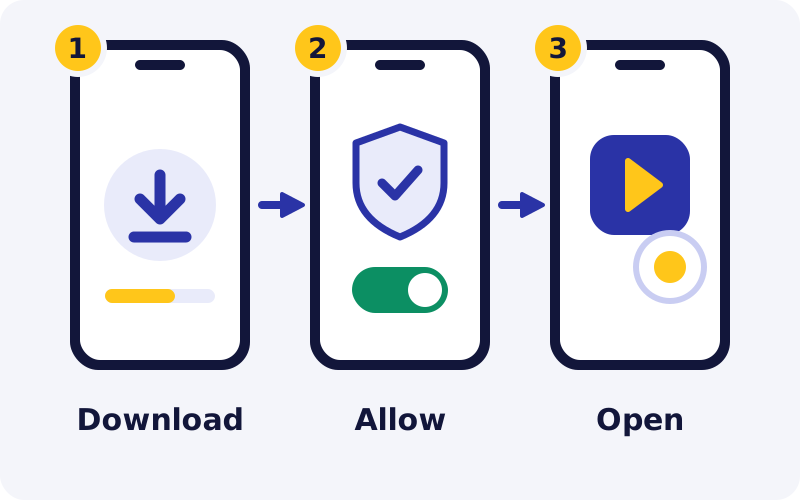
How do you do a Battery Bet APK download and install step by step?
The route differs by device. Pick your tab. In every case, start from a point where you are confident you are on the genuine site, and read the section on look-alike domains further down if you are not sure.
Check your phone first
Open Settings, then About phone, and confirm the Android version is 10 or higher. Check free storage under Settings, Storage. The reported minimum is 50 MB, but aim for several hundred MB free, because Android needs working space to unpack and optimise any app.
Open the operator's site in Chrome
Use Chrome or your phone's default browser, not an in-app browser inside Telegram, Instagram or WhatsApp. In-app browsers handle downloads poorly and hide the full address, which makes it harder to see where you really are.
Find the "Apps" menu
Reviewers describe the Android download as sitting under an "Apps" entry in the site menu. Tap the Android option. Chrome may warn that this type of file can harm your device. That warning appears for every APK, good or bad, so it tells you nothing about this particular file. Your judgement of the source is what matters.
Check the file before opening it
Open the Files or Downloads app and look at the file. The name should end in .apk and the size should be in the region of the reported 5.54 MB. If it ends in .apk.zip, .xapk or .exe, or asks you to install a "downloader" first, delete it.
Allow the install for this browser only
Tap the file. Android will say the browser is not allowed to install unknown apps and offer a Settings shortcut. Switch on "Allow from this source" for Chrome, go back, and tap Install.
Let Play Protect scan it
If Play Protect offers to scan the app, accept. The scan takes a few seconds. If Play Protect blocks the install or calls the app harmful, stop and read the errors table below instead of forcing it through.
Open, log in, then lock the door again
Open the app and sign in with your existing details or register. Then return to Settings and switch "Install unknown apps" back off for Chrome. Finally, delete the APK from Downloads. The app does not need it once installed.
Use Safari, not Chrome
On an iPhone the "Add to Home Screen" option that creates a web app lives in Safari. Reports say iOS 13 or newer is needed. Check under Settings, General, About.
Open the operator's site and log in
Load the site and confirm you are on the genuine one before entering anything. There is nothing to download and no profile to install. If a page asks an iPhone user to install a configuration profile or a "beta" through a link, leave it.
Tap Share, then "Add to Home Screen"
The Share button is the square with an upward arrow. Scroll the sheet until you see Add to Home Screen, give the shortcut a name you will recognise, and tap Add.
Open it from the Home Screen
The icon launches the site in its own window without Safari's address bar. You may need to log in once more, because a Home Screen web app keeps its storage separately from Safari.
Skip the install entirely
The mobile site carries the same account, cashier and games. Open it in Chrome or Safari and log in. This is the right choice for phones below Android 10, for work phones, and for anyone who would rather not sideload.
Add a shortcut if you want one
In Chrome on Android, open the three-dot menu and choose "Add to Home screen". This creates an icon that opens the site. It is a bookmark, not an app, and needs no special permission.
Bookmark the page you verified
Once you have confirmed the genuine site, save that exact address as a bookmark and use the bookmark every time. Searching afresh for the brand each visit is how people land on clones.
Tip. Do the download on Wi-Fi or a steady 4G signal with the screen on. Although the file is small, a download interrupted when the phone switches networks can leave a damaged file that later fails with a parse error.
For account access after the install, including OTP problems and password resets, see our guide to logging in to Battery Bet.
What does "Install unknown apps" mean on Android 10 to 15?
Older Android versions had one master switch called "Unknown sources". Turn it on and any app on the phone could install anything. From Android 8 onwards, and so on every version the Batery app supports, that switch was replaced by a permission granted to one app at a time.
When you allow Chrome to install unknown apps, you are telling Android that Chrome may hand an APK to the system installer. You are not approving the Battery Bet app as safe, and you are not opening the phone to every source. The weakness is that the permission stays on until you remove it. If you later tap a bad link in Chrome, a malicious download is one tap closer to being installed.
How to switch it off again
Menu names vary by brand, so use the search bar at the top of Settings and type "unknown apps" if the path below does not match your phone.
| Phone type | Typical path |
|---|---|
| Stock Android (Pixel, Motorola, Nokia) | Settings, Apps, Special app access, Install unknown apps, Chrome, turn off "Allow from this source" |
| Samsung One UI | Settings, Apps, three-dot menu, Special access, Install unknown apps, Chrome |
| Xiaomi, Redmi, Poco | Settings, Privacy or Protection, Special permissions, Install unknown apps, Chrome |
| Realme, Oppo, OnePlus, Vivo | Settings, Apps or Privacy, Special app access, Install unknown apps, Chrome |
Check the list while you are there. Any app showing "Allowed" that you do not recognise, or that has no reason to install software, such as a file manager, a messaging app or a video downloader, should be set back to "Not allowed".
Extra protections on newer Android versions
Android 13 and later add "restricted settings": a sideloaded app cannot be given accessibility or notification-reading access without extra deliberate steps. Newer versions also refuse to install apps built for very old Android releases, and Play Protect can block a sideloaded app that asks for sensitive permissions such as reading SMS. These barriers exist because banking-fraud malware in India often arrives as a sideloaded APK. If a betting app pushes you to bypass them, that is a warning sign in itself.
How do you verify a Battery Bet APK before you trust it?
No single check proves a file is genuine. Five checks together make a bad file much less likely to get through. They take about two minutes.
Source
The file should come from the operator's own site, from its "Apps" menu, in a normal browser. A file forwarded on WhatsApp, posted in a Telegram channel, linked under a YouTube video or offered by an "APK download" portal is a copy of unknown origin, even if it carries the right name and icon.
Size and version
Compare the file with what the operator's download page states and with the reported 5.54 MB and version 1.7.9. Repackaged malware usually changes the size, because extra code has been added. A match does not prove safety, but a clear mismatch is enough to delete the file.
Permissions requested
A betting client needs network access and, optionally, notifications. It may ask for the camera or files when you upload KYC documents. It has no good reason to read your SMS, contacts or call logs, to act as an accessibility service, to draw over other apps or to become a device administrator. Those are the permissions used to intercept OTPs and control banking apps.
Play Protect scan
Open the Play Store, tap your profile picture, choose Play Protect and tap Scan. Play Protect checks sideloaded apps as well as store apps. It does not catch everything, so treat a clean result as one signal, not a certificate.
Behaviour after install
The genuine client should let you log in with the same account that works on the site. A fake typically asks you to "re-verify" with card details, your UPI PIN or an OTP that is not for login, or shows a different balance from the website.
If you have read the checks above and still want the app, the button below opens Batery, where the Android download sits in the site's Apps menu.
18+ only. Terms apply. Real-money play carries financial risk and may be restricted where you live.Battery Bet download for iOS: how the web app works and where it stops
People searching "battery bet download ios" are usually looking for an App Store link. There is none. Reports are consistent that Batery has no native iOS app and instead offers a progressive web app, or PWA, which is the website saved to your Home Screen from Safari.
A PWA runs inside Safari's engine but in its own window. Nothing is installed in the sense of an App Store app, no Apple review has taken place, and nothing needs a developer certificate. That is a real safety advantage over Android sideloading, because there is no file to fake.
The limits of the iPhone route
- Web push notifications for Home Screen web apps exist only on more recent iOS versions, and only if the site supports them and you grant permission. On older iPhones expect none.
- iOS can clear stored data for web apps that are not used for a while, so you may be asked to log in again.
- Biometric login depends on what the site implements. Do not assume Face ID will be offered.
- The shortcut points at one address. If that address is blocked or the operator moves to a mirror, the icon stops working and you will need to create a new one from the working site.
- Any offer of an "IPA file", a TestFlight invite or a configuration profile for a Battery Bet iOS app does not match any public description of how the operator distributes its app. Treat it as unsafe.
App, mobile site or PWA: which should you use?
All three reach the same account, odds and cashier. The differences are about convenience and about how much trust you extend to a file.
| Feature | Android APK app | Mobile site in browser | iOS web app (PWA) |
|---|---|---|---|
| Needs a file install | Yes | No | No |
| Needs "unknown apps" permission | Yes | No | No |
| Risk of a fake installer | Real, if the source is wrong | None, but clone sites still exist | None, but clone sites still exist |
| Storage used | About 11.7 MB reported, plus cache | Browser cache only | Web app cache only |
| Push notifications | Yes, if you allow them | Limited | Newer iOS versions only |
| Updates | Prompt on launch, you confirm | Automatic, always current | Automatic, always current |
| Works on Android 9 or older | No | Yes | Not applicable |
| Affected if a domain is blocked | Can be | Yes | Yes |
A simple decision rule: if you bet often on one phone you control, and you are willing to do the checks above, the app is the more convenient option. If you play occasionally, share the phone, use a work device or feel unsure about sideloading, the mobile site gives you the same functions with less to go wrong.
Will the Battery betting app run well on your phone?
The reported minimums of Android 10, 1 GB RAM and 50 MB of storage describe what the app needs to start. They say little about how smooth it will feel. We have no benchmarks and will not invent any, but the general behaviour of thin-client apps on entry-level hardware is well understood.
Budget phones
Entry-level phones with 2 to 3 GB of RAM should handle sports markets and bet slips. Live dealer video and heavy slot games are the stress point, because Android closes background apps to free memory and the stream may reload.
Low storage
Android can refuse to install when free space is very low, whatever the app size. Clear WhatsApp media, old downloads and unused apps first. Keep at least a few hundred MB free so updates do not fail later.
4G data use
Browsing odds uses little data. Live casino video and animated games use far more, similar to watching video. If you are on a daily data pack, a long live session can exhaust it and leave you offline mid-game.
Old Android versions
A phone that stopped at Android 9 or below cannot install the reported build. Do not hunt for an "old version APK" on third-party sites. Use the browser instead.
Weak signal
If the connection drops while a bet is being placed, do not tap again repeatedly. Wait, reopen the app and check bet history first. Double taps on a slow network are a common cause of duplicate bets.
Shared phones
On a family phone, log out after each session and keep a screen lock. An open betting app with a funded balance is a risk around children and around anyone who borrows the handset.
Updates, notifications, data and battery use
How updating works
Because the app does not come from the Play Store, Play does not update it. The operator states that the app checks for a new version on launch and asks you to confirm. Confirming downloads a new APK and runs the same installer, so Android will again need the "unknown apps" permission, this time for the Batery app itself or for the browser.
Accept update prompts only when they appear inside the app you already verified, or take the new file from the operator's site. A message on Telegram, SMS or WhatsApp saying "update your Battery Bet app here" is a delivery method for fake builds. Android updates an app in place only if the new file is signed with the same key, so an "update" that demands you uninstall first deserves extra suspicion.
Notifications
On Android 13 and newer, an app must ask before sending notifications. You can decline and the app still works. Betting notifications are mostly promotional and are designed to bring you back, so if you are trying to keep play occasional, leave them off. To change your mind, go to Settings, Apps, the Batery app, Notifications.
Data and battery tips
- Restrict background data for the app under Settings, Apps, Mobile data, so it only uses data while open.
- Close the app fully after a session. Live streams left running in the background drain both battery and data.
- Lower screen brightness during long live sessions. The display, not the app, is usually the biggest drain.
- If the app turns sluggish, clear its cache under Settings, Apps, Storage. This does not delete your account, which lives on the operator's servers.
Common Battery Bet APK install errors and how to fix them
Most install failures have ordinary causes. The table lists the messages Android users most often meet with sideloaded apps, the usual reason and the safe fix.
| Message or symptom | Likely cause | What to do |
|---|---|---|
| "App not installed" | Not enough storage, or an older copy signed with a different key is already present, often a fake or a build from another source. | Free up space. Uninstall any existing copy, then install the fresh file from the operator's site. |
| "There was a problem parsing the package" | The download is incomplete or corrupted, or the phone's Android version is below the app's minimum. | Delete the file and download again on a stable connection. Confirm you are on Android 10 or newer. |
| "Blocked by Play Protect" | Play Protect does not recognise the developer or has flagged the file's behaviour or permissions. | Do not switch Play Protect off to force it. Recheck the source. If in doubt, use the mobile site. |
| Download stuck or stays "pending" | Weak network, data saver, a full Downloads folder, or the domain being blocked on your network. | Switch between Wi-Fi and mobile data, clear old downloads, retry in Chrome. Avoid random "unblocker" apps. |
| "For your security, your phone is not allowed to install unknown apps from this source" | The browser has not been given the per-app permission. | Tap Settings on the prompt, allow for that browser, install, then switch it off again. |
| Install button greyed out or untappable | A screen overlay such as a blue-light filter or chat bubble is active, and Android blocks taps for safety. | Turn off the overlay app temporarily and try again. |
| App opens to a blank or loading screen | The address the app connects to is unreachable or blocked, or the build is outdated. | Check whether the site loads in a browser. If the site works, take the current build from its Apps menu. |
| App installed but login fails | Wrong credentials, a blocked account, or a fake app that is not connected to the real platform. | Test the same login on the genuine site. If it works there but not in the app, uninstall the app. |
Warning. If a "support agent" offers to fix an install problem by phone or asks you to install AnyDesk or another screen-sharing app, end the conversation. Batery publishes no phone, customer care or WhatsApp number. Its stated channels are live chat, support@batery.in and the Telegram account @batery_in. Our helpline number guide explains the scam pattern.
Fake APKs, "mod" and "hack" builds, Telegram channels and domains like "battery bets.in"
The brand's popularity in search has produced a large shadow market of copies. Understanding why they exist makes them easier to ignore.
Why a mod or hack APK cannot do what it claims
Balances, bet settlement and game results are held on the operator's and the game providers' servers. The app only displays them. Editing the app on your phone can change what the screen shows, but not what the server records. Aviator rounds, for example, are generated server-side with a provably fair hash, which our Aviator guide explains. So an "unlimited balance", "predictor" or "always win" build has nothing real to offer. What it can do is capture your login, read your OTPs or push you to pay for an "activation key".
Telegram APK channels
The operator's stated Telegram account is @batery_in. Anyone can create a channel with a similar name, the same logo and a pinned APK file. Files shared in channels are not checked by anyone, and channel admins who message you first offering "VIP builds", "agent IDs" or deposit help are following a script. Even where a channel is genuine, the safer habit is to take the file from the site, not from a chat.
Look-alike domains
Searches such as "battery bets.in" show how people guess at the address. Many similarly named domains exist: different spellings, added words like "bet", "app" or "india", and different endings. Some are the operator's own mirrors, some are affiliate pages, and some are clones built to collect deposits or logins. We cannot tell you that a particular guessed address is genuine, and we do not print one as the official URL because mirrors change.
The licence gives you a fixed reference that a changing address cannot. Batery is licensed in Curaçao under number OGL/2024/107/0914, and the operator is YouGMedia B.V. The number identifies the licence, and the company name identifies who you contract with. Both stay the same on every genuine mirror, so check them in the footer before you open the Apps menu, and check that the terms and conditions name the same company. A download page that shows neither detail, or shows a number in a different format, is not a page to take an installer from.
Signs of the genuine site, taken together:
- The footer names YouGMedia B.V. and Curaçao licence OGL/2024/107/0914.
- The support email shown is support@batery.in, and no phone number is offered.
- Your existing account logs in and shows the correct balance and history.
- Deposits go through the site's cashier, never to a personal UPI ID sent by chat.
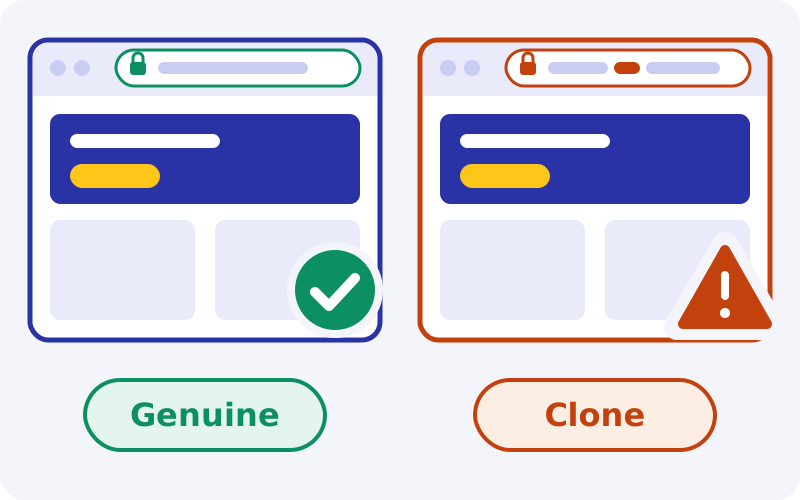
Our real or fake assessment goes deeper into the licence and the clone problem. If you have already entered details into a suspect app, change your password from the genuine site, call your bank about any UPI payment, and report it on 1930 or at cybercrime.gov.in.
Privacy, permissions and how to uninstall the app completely
An operator of this kind necessarily holds your phone number, email, KYC documents and payment history. The app adds device-level data such as model, Android version and an advertising identifier. You cannot verify from outside how that data is handled, and because the operator is based outside India, no Indian regulator will take up a complaint about it for you.
| Permission | Reasonable use | Our suggestion |
|---|---|---|
| Notifications | Bet results, promotions | Optional. Decline if you want fewer prompts to play. |
| Camera or photos | Uploading ID for KYC | Allow "only this time", when you actually upload. |
| Location | Regional checks | Decline unless the app will not work without it. |
| SMS, contacts, call logs | None that justifies the risk | Deny. If the app insists, uninstall. |
| Accessibility, display over apps, device admin | None | Deny and uninstall. This is malware behaviour. |
Removing the app and its data
Go to Settings, Apps, select the app, open Storage and tap Clear data, then Uninstall. Delete any leftover APK in Downloads and confirm the browser's "Install unknown apps" setting is off. On iPhone, press and hold the Home Screen icon and remove it, then clear the site's data under Settings, Safari, Advanced, Website Data.
Note. Uninstalling removes the app, not your account. Any balance, pending withdrawal and stored documents stay with the operator. Withdraw first if you can, and ask support in writing for account closure or self-exclusion if that is what you want. See our withdrawal time guide before you request a payout.
How we rate the Battery Bet app on public evidence
We did not install or use the app. These scores are reasoned from public reviews, the operator's stated process and how sideloading works on Android.
Install ease gets 3.5 because the steps are few, but they include a security permission many users do not understand. Size and performance gets 3.5 for a very light reported footprint, held back because nothing is independently measured. iOS support gets 2.5: a web app works, but it is not a native app. The update process gets 2.5 because manual, in-app updates are easy to imitate. Sideloading safety gets 2, reflecting the volume of fake builds and the absence of store vetting or Indian legal recourse.
What works
- Licensed in Curaçao, with licence number and operator name to check in the footer
- Very small reported download and installed size
- Same account, cashier and live chat as the site
- English, Hindi and Bengali interface
- iPhone users need no file at all
What to watch
- Sideloading with no store vetting
- Many fake, mod and clone builds in circulation
- No native iOS app
- Can be blocked in India, with no local recourse
If a deposit made in the app does not arrive, our deposit problem guide covers the steps. Bonus terms shown in the app are explained in the bonus guide.
Responsible play when the bookmaker is one tap away
An app removes friction, and friction is what gives you time to reconsider a bet. Every game carries a house edge, so the long-run expectation is a loss, and a faster route to the cashier only speeds that up. The app is for adults aged 18 and over only.
Practical controls: set a deposit limit through support before your first deposit, keep notifications off, keep the icon off your first Home Screen, and never save your banking app PIN where a late-night impulse can reach it. If play stops feeling like a choice, ask support for self-exclusion and uninstall the app. Tele-MANAS on 14416 is a free, 24/7 government mental-health line. More tools are in our responsible gaming guide.
Prefer not to sideload anything? The button below opens Batery in your browser, where the same account works without an APK.
18+ only. Terms apply. Real-money play carries financial risk and may be restricted where you live.Frequently asked questions
Does Izaro News provide a Battery Bet APK download?
No. We do not host, mirror or link directly to any APK file. We are an independent guide, not the operator. The Android file is offered from the "Apps" menu on the operator's own site. A third-party page offering its own download button for the file is the same pattern used to spread fake builds, so we avoid it.
Is the Battery Bet app on the Google Play Store?
A Play listing exists under the package id com.batery.bet.gp.app, but we could not verify its rating or whether it offers real-money play. Real-money gaming apps are not permitted on Google Play in India, which is why the operator distributes an APK directly. Read the live listing carefully and do not assume it is the same client.
What is the latest Battery Bet APK version and size?
A public review reports version 1.7.9, an APK of about 5.54 MB and roughly 11.7 MB once installed, needing Android 10 or newer, 1 GB RAM and 50 MB free space. We have not verified these ourselves, and each new release can change them. The operator's download page is the figure to trust.
Is it safe to install the Battery betting app?
No sideloaded app can be called fully safe, because no store has vetted it. You can reduce the risk by downloading only from the operator's site, checking size and version, refusing unusual permissions, running a Play Protect scan and switching "Install unknown apps" off afterwards. Before downloading, also match the Curaçao licence number OGL/2024/107/0914 and the operator name YouGMedia B.V. in the site footer.
Is there a Battery Bet download for iOS?
There is no native App Store app. iPhone and iPad users open the site in Safari, tap Share and choose Add to Home Screen, which creates a web app reported to need iOS 13 or newer. Nothing is downloaded. Offers of an IPA file, TestFlight link or configuration profile should be treated as unsafe.
Why does my phone say "App not installed"?
The two usual causes are low storage and a conflict with a copy already on the phone that was signed with a different key, often a build from another source. Free up space, uninstall the existing copy, download a fresh file from the operator's site and try again. Do not disable Play Protect to get past it.
Do Battery Bet mod or hack APKs work?
No. Balances and game results are stored and decided on servers, not in the app, so a modified app cannot add money or predict outcomes. These files exist to steal logins, intercept OTPs or sell fake "activation". Installing one can also get a genuine account blocked and put your banking apps at risk.
Is "battery bets.in" the real site?
We cannot confirm any guessed address, and we do not publish an official URL because mirrors change and clones exist. Check the site itself: the footer should name YouGMedia B.V. and Curaçao licence OGL/2024/107/0914, the support email should be support@batery.in, no phone number should be offered, and your existing account should log in normally.
How do I update the app?
The operator states that the app checks for a new version when it opens and asks you to confirm. Accept updates only from inside the app you already verified, or download the new file from the operator's site. Ignore update links sent by SMS, WhatsApp or Telegram, which are a common way to distribute fake builds.
Will uninstalling the app delete my account?
No. Uninstalling removes the app and its local data from your phone only. Your account, balance, documents and history remain on the operator's servers. If you want the account closed or self-excluded, withdraw any balance you can and ask support in writing through live chat or support@batery.in.
How do I check the Battery Bet licence before downloading the app?
Batery is licensed in Curaçao under number OGL/2024/107/0914, and the operator is YouGMedia B.V. Before you open the Apps menu, scroll to the footer of the site and compare both details character by character. If the licence line is missing, shortened or altered, do not download anything from that page.
Is it legal to use the Battery Bet app in India?
The 2025 Act prohibits offering, advertising and facilitating payments for online money games in India, with penalties aimed at providers rather than individual players. Batery is licensed in Curaçao, and Indian law applies separately. Using it leaves you without Indian consumer protection, and access or payments can be blocked. This is not legal advice, so check the current position.
Our bottom line
On public evidence the Battery Bet app is a light, simple wrapper around the same platform you reach in a browser. The technical install is easy. The risks sit around it: a file with no store vetting, a crowd of fake and "hack" builds, and an app that can be blocked in India with no local dispute route. Batery itself is licensed in Curaçao, and the licence number and operator name in the footer are how you confirm the download page is the right one. If you go ahead, take the file only from the operator's site, verify it, and close the permission afterwards. If any step feels uncertain, the mobile site does the same job with less exposure.
Sources
- SportsCafe: Batery app review
- SportsCafe: Batery review
- Telecom Asia: Batery casino review
- SportsBoom: Batery contact and complaints
- Wikipedia: Promotion and Regulation of Online Gaming Act, 2025
- Press Information Bureau: A New Era of Online Gaming Governance
- National Cyber Crime Reporting Portal