Quick answer
- Batery is licensed in Curaçao: licence number OGL/2024/107/0914, operator YouGMedia B.V. Both details are printed in the footer of the genuine login page.
- This page cannot log you in. Battery Bet (Batery) accounts are opened and accessed only on the operator's site, its Android APK or its iPhone web app. Anyone else asking for your password or OTP is not the operator.
- Sign up generally takes a phone number or email, a password, a currency choice (pick INR) and a choice between the sports and the casino welcome track. Only one track can be activated.
- One login works everywhere: mobile browser, app and desktop use the same account and the same balance.
- Most failed logins come down to four things: a wrong identifier format, an OTP that never arrived, a locked or frozen account, or a blocked or changed site address.
- Never search for a "new login link" and type your password into whatever turns up. Clone pages exist, and the operator publishes no phone or WhatsApp helpline.
- Support is by 24/7 live chat, email at support@batery.in and Telegram. Email replies are reported at 24 to 48 hours, so prevention is quicker than recovery.
- Licence
- Licensed in Curaçao, OGL/2024/107/0914, operator YouGMedia B.V.
- Where login happens
- Operator's site, Android APK or iPhone web app only
- Login form on this site
- None. Izaro News is an independent guide
- Account setup
- INR available. One welcome track, sports or casino
- Verification
- Phone or email, profile data, photo ID sent to support
- Phone helpline
- None published by the operator
What this Battery Bet login guide can and cannot do
Izaro News is not Batery. We do not run the betting site, we hold no account data, and there is no box on this page where you can type a username or password. If a page that looks like ours ever asks for your Battery Bet login details, it is not us and you should close it.
What we can do is explain the mechanics, so that most errors become easy to diagnose. We worked from public sources: independent reviews, the operator's published statements as reviewers relay them, the licence details and Indian legal texts. We did not register, deposit or contact support ourselves, and where the public record is thin we say so. Our method is set out on the how we research page.
Note. The Play Batery button on this site is a commercial link to the operator. It is the only route we offer. We do not print any Batery web address as "the official one", because mirror addresses change and look-alike sites copy whatever address is popular at the time.
Who is behind the account you are opening
Batery holds a Curaçao gaming licence, number OGL/2024/107/0914, and the operator named on it is YouGMedia B.V. That detail matters for a login guide because it is one of the few things a clone site tends to get wrong or leave out. A genuine page shows the operator name and licence number in the footer and offers support through support@batery.in.
The two details do different jobs. The number identifies the licence, which is overseen by the Curaçao Gaming Control Board. The company name identifies who you contract with when you tick the terms box at sign up. Both are fixed, so they stay the same on every genuine mirror address and in the app, however often the web address changes. Before a first login on any new address, match the footer against these details character by character, and check that the terms and conditions name the same company. It takes under a minute and it is a stronger check than the look of the page.
When you create an account you are entering into a contract with that company, which is based outside India, and any dispute about a locked account or a frozen balance is handled by that company's support team, not by an Indian regulator or ombudsman. Our real or fake assessment goes through the licence details in more depth.
How does Battery Bet sign up work?
Battery Bet sign up follows the pattern common to offshore betting sites that serve India. The aim of the form is to create a unique identifier for you, attach a secret to it, and record the settings that cannot easily be changed later. The exact fields can differ between the site and the app and can change without notice, so treat what follows as a description of what such forms typically ask for, not as a fixed list.
The three common registration styles
Phone number
You enter a mobile number with the +91 country code and confirm it with a one-time code sent by SMS. The number becomes your login identifier. It is quick, but your access now depends on keeping that SIM active.
Email address
You enter an email and a password and confirm through a link or code sent to the inbox. Recovery later runs through that inbox, so an email account you actually control and check is essential.
Quick or one-click
Some offshore sites generate a login and password for you in one tap. It is fast, but the account has no recovery channel until you add and confirm a phone or email. If the site offers this, save the generated details at once.
We cannot confirm from public sources which of these styles the Battery Bet form shows on a given day. Whichever you see, the contact you register with is the contact that will rescue the account later.
What the registration form typically asks for
- A phone number or an email address, which becomes the login identifier.
- A password that you choose, usually entered twice.
- An account currency. Choose INR if you plan to pay by UPI, PhonePe, Paytm or bank transfer.
- A welcome bonus selection: sports, casino, or in some flows no bonus.
- An optional promo code field.
- Tick boxes confirming that you are 18 or over and that you accept the terms.
Open the genuine site or app
Start from a route you trust, not from an advert, a Telegram forward or a search result promising a new link. Before typing anything, check the footer for the operator name YouGMedia B.V. and the Curaçao licence number.
Choose how to register
Pick phone or email according to which one you are more certain to still control in a year. If you change SIM often, email is the safer anchor. If you rarely read email, the phone number is.
Enter the identifier carefully
For a phone number, confirm that the country code shows +91 and enter the ten digits without a leading zero. For email, check the spelling of the domain. A single wrong character creates an account that no reset message can ever reach.
Create a password you have never used elsewhere
Use the method described later in this guide. Do not reuse the password from your email, your UPI app or any other betting site.
Select INR and your welcome track
Both choices are hard or impossible to reverse. Read the next two sections before you tap.
Confirm the code or link
Enter the OTP from the SMS or tap the link in the email. Until this is done the account is unconfirmed and recovery may not work.
Complete the profile with your real details
Use your name exactly as it appears on your ID and your bank account. A mismatch here is one of the most common reasons a withdrawal is held at verification.
Do you need a promo code to register?
No. The standard welcome offer does not require a code. Codes circulating online are affiliate tracking codes that belong to individual partner sites, and they normally unlock the same public offer. Izaro News does not issue a code of its own. Be wary of pages that advertise a "100% working" code, because the promise is usually bait for a click to a look-alike registration form. The Battery Bet bonus guide explains how the offers and their wagering terms are reported.
Why should you pick INR and decide your welcome track before registering?
Two fields on the sign-up form deserve more thought than the rest, because they shape everything that happens after your first Battery Bet login.
Currency: why INR is the practical choice
The account currency decides which deposit and withdrawal methods the cashier shows you. Public reviews list UPI, PhonePe, Paytm, Google Pay, IMPS or bank transfer, AstroPay and crypto as deposit routes for India. The rupee methods are tied to an INR account. If you register in USDT, you should expect a crypto-oriented cashier and you carry exchange-rate movement between the time you deposit and the time you withdraw.
At offshore operators generally, the currency is locked once the account is created. We could not confirm the exact Batery policy from public sources, so assume the choice is permanent.
Welcome track: sports or casino, not both
Only one welcome track can be activated. That is the one firm point on which sources agree. On the size of the offer they do not agree. One 2026 review describes a package of 500% up to ₹1,50,000 plus 430 free spins spread across the first five deposits. Another lists a sports welcome of 200% up to ₹25,000 with 15x wagering and a casino welcome of 150% plus 200 free spins up to ₹25,000 with 30-day validity. A third listing shows 150% up to ₹30,000 plus 200 free spins. The minimum deposit is reported as ₹300.
| If you mainly plan to | Track that fits | What to check before choosing |
|---|---|---|
| Bet on cricket and other sports | Sports | Wagering multiple, minimum odds per qualifying bet, whether single bets count |
| Play slots | Casino | Wagering multiple, game weighting, maximum bet while the bonus is active, free spin cash-out cap |
| Play Aviator or live tables | Read the terms first | Crash and live games are often weighted low or excluded from casino wagering at offshore sites |
| Deposit a small amount and withdraw freely | Consider no bonus | A bonus ties up your deposit until wagering is complete |
Here is why the decision matters in rupees. Suppose, hypothetically, you deposit ₹1,000 and take a 200% sports bonus with 15x wagering applied to the bonus amount. The bonus is ₹2,000, so you would need to place ₹30,000 of qualifying bets before the bonus money becomes withdrawable. If the terms apply the multiple to deposit plus bonus, the requirement is ₹45,000. Both the multiple and the base it applies to are stated in the terms, and you should read them before the first deposit, not after.
Legal position in India. The Promotion and Regulation of Online Gaming Act, 2025 received presidential assent on 22 August 2025 and prohibits offering online money games, advertising them and facilitating payments for them. Rules under the Act were notified on 22 April 2026 and are in force. The penalties are aimed at operators, advertisers and payment facilitators, not at individual players, but an account on an offshore site gives you no Indian consumer protection. Constitutional challenges were consolidated in the Supreme Court, so check the current status. Batery's licence is issued in Curaçao, and Indian law on real-money gaming applies separately. In practice this means a site, app or mirror can be blocked without notice and a login that worked yesterday can stop loading. This is general information, not legal advice.
Battery Bet login on mobile browser, app and desktop
There is one account and several doors into it. The Battery Bet login mobile users see in Chrome, the Battery Bet app login on Android and the desktop login all check the same identifier and password against the same record. Your balance, open bets, bonus progress and verification status follow you between them.
The mobile site needs nothing installed. Open the site in Chrome or another up-to-date browser, tap the login button, choose phone or email according to how you registered, and enter the password.
The advantage of the browser is that you can see the full address and the padlock before you type. If the browser offers to save the password, accept only on a phone that nobody else unlocks.
The Android client is an APK downloaded from the operator's own site, from the Apps menu. Reviewers report version 1.7.9 at about 5.54 MB. Real-money gaming apps are not permitted on Google Play in India under the 2025 Act, which is why sideloading is used.
The Battery betting app login uses the same details as the site. The app checks for updates on launch and asks you to confirm. An outdated build is a frequent reason for a login screen that spins and never completes, so accept genuine updates when the app itself prompts for them.
The risk here is the file, not the login. A fake APK can show a perfect copy of the login screen and send what you type to a stranger. Download only from the operator's own site, compare the file size and version with what reviewers report, and scan it with Play Protect. There is also a Google Play listing under the package id com.batery.bet.gp.app. We could not verify whether it offers real-money play, so read the live listing and do not assume it is the same client. The APK download and safety guide covers the checks step by step.
There is no native App Store app. On iPhone the operator offers a web app: you open the site in Safari on iOS 13 or later, use Share, then Add to Home Screen. The icon opens the site in a full-screen window.
Because it is a web page in a wrapper, login behaves as it does in Safari, and Private Browsing will sign you out each time.
On a laptop or desktop the login panel sits at the top of the page. The larger screen makes two things easier: reading the full address in the address bar, and using a password manager extension that fills the password only on the address it was saved for.
A password manager matches on the exact domain, so if the fill does not appear on a page that looks right, treat it as a warning and check the address.
| Route | Install needed | Can you see the address bar | Main risk | Best for |
|---|---|---|---|---|
| Mobile browser | No | Yes | Stale bookmark, searching for a new link | Occasional use, first visit |
| Android APK | Yes, sideloaded | No | Fake APK from a third-party page | Regular use on your own phone |
| iPhone web app | Home Screen shortcut | No, once added | Shortcut created from a clone page | iPhone users |
| Desktop browser | No | Yes | Shared or work machines | Uploading documents, reading terms |
If you have read the steps and want to open the Batery site to register or sign in, the button below is the route we provide.
18+ only. Terms apply. Real-money play carries financial risk and may be restricted where you live.How to choose a password you can remember and nobody can guess
Searches for "battery bet login password" usually mean one of two things: the person wants to know the rules, or they have forgotten it. Start with the rules.
What the password field usually requires
Offshore betting sites typically set a minimum length and may require a mix of letters and digits. The form itself tells you the exact requirement when a password is rejected, and that on-screen message is the authority. We do not state a specific minimum for Batery because public reviews do not document one reliably.
The four random words method
Length protects you more than odd symbols do. The reason is arithmetic: each added character multiplies the number of possible passwords, so a long phrase built from unrelated words is far harder to guess than a short string with a symbol swapped in.
Pick four unrelated words
Choose words with no link to you or to each other. Not your name, your team, your city or your birth year. Opening a book at random pages works well.
Join them with a separator
A hyphen or a full stop between words adds length and satisfies most symbol rules.
Add a number that is not a date
Put two or three digits somewhere other than the end. Avoid 123, your birth year and the current year.
Store it in a password manager
Use the manager built into your phone or a dedicated one. If you prefer paper, keep the note at home and not in your phone case or wallet.
Do not reuse. The most common way betting accounts are taken over is not clever hacking. A password leaks from some unrelated website, attackers try the same email and password on gambling sites, and it works because the owner reused it. A password that exists only on your Batery account cannot be exposed by a leak anywhere else.
Forgot your Battery Bet login password? How the reset flow works
A reset does not reveal your old password. Properly built sites do not store passwords in readable form, so nobody at the operator can tell you what it was. A reset proves that you control the registered contact and then lets you set a new secret.
- Step 1 On the login panel, choose the forgotten password link and enter the phone number or email the account was registered with.
- Step 2 The site sends a code by SMS or a link by email to that contact only. Links and codes of this kind expire after a short period.
- Step 3 Enter the code or open the link on the same device, then set a new password that you have not used before.
- Step 4 Log in with the new password. Check the profile and the transaction history for anything you do not recognise.
- If nothing arrives Check spam, wait a few minutes, and request once more. Then move to live chat with your registered identifier ready.
What if you no longer have the registered number or email?
This is the hard case. The automatic reset cannot work, because the code goes to a contact you no longer control. The only route is support, by live chat or by email to support@batery.in, and you should expect to prove identity with the same documents used for verification. Public reviews describe verification as taking up to 24 hours by one account and about three days by another, so allow for the longer figure.
Tip. When you ask support for help with a password, they may ask for your registered identifier and ID. They have no reason to ask for the password itself, an OTP that has just been sent to your phone, your UPI PIN, or remote access to your screen. Any of those requests means you are not talking to the operator.
Why is the OTP not arriving on your phone?
An OTP travels a longer path than most people assume. The site asks an SMS provider to send it, the provider hands it to an Indian telecom route, your network checks it against its filtering rules, and only then does it reach your handset. A delay or a block at any point looks the same from your side: nothing arrives.
Wrong country code or number format
This is the simplest cause and the easiest to miss. If the country selector is not on +91, or you typed a leading zero or the 91 a second time inside the number field, the message is sent to a number that does not exist or belongs to someone in another country. Look at the number shown on the confirmation screen before you wait for anything.
Network delay and SMS queues
International and promotional routes are slower than bank OTP routes. During a big IPL match, when many people register or log in at once, delivery can lag by minutes. Requesting a new code again and again makes it worse, because each new request can cancel the previous code. You then type an older code that has already been replaced and see an "invalid code" error.
DND and message filtering
Indian networks filter commercial SMS under telecom rules, and a number registered for Do Not Disturb can have some categories of message blocked. Transactional codes are meant to pass, but messages from offshore senders do not always arrive on a route that the network classifies that way. Your phone's own spam protection can also move the message into a spam or blocked folder without a notification.
| What you see | Likely cause | What to try |
|---|---|---|
| No SMS at all | Wrong country code, DND filtering, no signal | Confirm +91 and ten digits, check signal on the right SIM, look in spam and blocked folders |
| SMS arrives late | Slow route or peak traffic | Wait the full countdown before requesting again |
| Code rejected as invalid | An older code typed after a newer one was requested | Request once, wait, use only the latest message |
| Code rejected as expired | Entered after the validity window | Request a fresh code and enter it straight away |
| Too many attempts | Rate limit triggered by repeated requests | Stop and wait. Further attempts extend the block |
| OTP never works on this number | Persistent network filtering | Ask live chat whether email confirmation can be used instead |
An OTP you did not request is a warning. If a login or reset code arrives when you were not trying to sign in, someone else has entered your number. Do not share the code with anyone, including a caller who claims to be from Batery customer care. Change your password and tell support through live chat.
Why would a Battery Bet account be locked or frozen?
A lock and a freeze are different things. A lock is automatic and short: too many wrong passwords or codes, and the system pauses attempts to stop guessing attacks. It usually clears after a wait or a password reset. A freeze is a decision by the operator's risk or verification team, and it stays until that team is satisfied.
A freeze normally follows something the verification team wants explained, and knowing the triggers in advance is the best way to avoid one. The usual triggers at offshore operators are a name mismatch between profile and payment method, documents that are unreadable or pending, signs of more than one account, a deposit from someone else's UPI or bank account, and bonus terms the operator believes were breached.
If it happens, ask live chat for the specific reason and the specific document required, then follow up by email to support@batery.in so that there is a written record. Reviewers mention raising a complaint within five days of the event. Do not open a second account to get around the freeze, because that gives the operator a clear ground to close both. The escalation path beyond support is set out in our guide to contacting Batery support.
What if the site is blocked or the Battery Bet login address has changed?
A mirror is a copy of the same site served from a different web address. Offshore operators use mirrors because addresses get blocked in countries that restrict them, India included. A genuine mirror connects to the same account database, so your existing login works and your balance is unchanged.
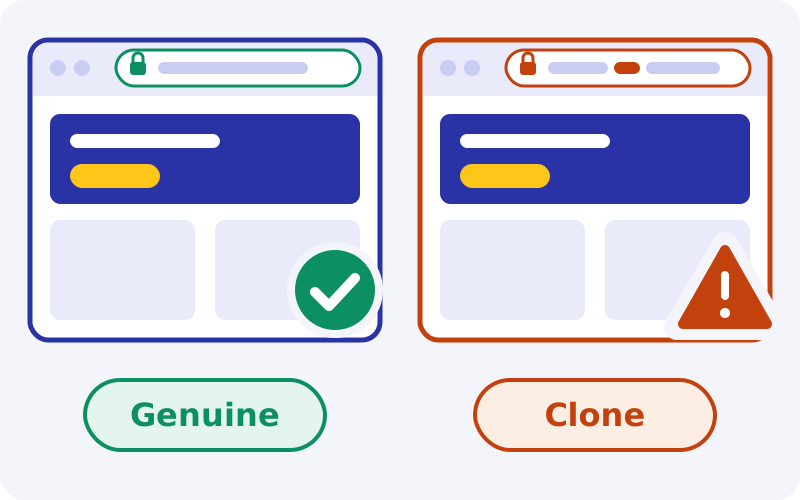
That same habit is what makes clones dangerous. Players learn to expect the address to change, so a stranger's look-alike page seems normal. A clone has one purpose: to collect the phone number, password and OTP you type, or to take a "deposit" that never reaches any account.
How to check a login page before typing
- Read the whole address in the address bar, including the ending. Extra words, swapped letters and unusual endings are the usual tells.
- Look for the padlock. It shows the connection is encrypted, which every genuine login page has. It does not prove who owns the site, because clone operators obtain certificates too.
- Scroll to the footer for YouGMedia B.V. and licence OGL/2024/107/0914, and check that support is offered at support@batery.in.
- Apply the account test. Your existing login should work and show your real balance and history. A page that asks an existing customer to "re-register" or to deposit before logging in is not a mirror.
About VPNs. We do not recommend using a VPN to reach a blocked betting site. Operators' terms commonly prohibit masking your location, a login that appears to come from another country can trigger a security hold, and a mismatch between your documents and your apparent location complicates verification. If the site does not open from India, that is the legal restriction working as intended, and the decision whether to continue is yours to make with that in view.
When the address stops loading, do not search for a new one. Ask through a channel you already trust: the app you installed from the operator's site, or the operator's Telegram channel if you joined it from the genuine site. The operator publishes no phone, customer care or WhatsApp number, so any number offering a "new login link" is a scam. If you have already typed details into a doubtful page, change the password at once, and if money has moved, call your bank, ring the national cybercrime helpline on 1930 and file a report at cybercrime.gov.in.
What happens after login: KYC and the one-account rule
Logging in gives you access. Verification decides whether money can leave. Reviewers describe the process as confirming phone or email, completing profile data and sending a photo of an ID document to support. Documents typically accepted from Indian users at offshore sites are Aadhaar, PAN, passport or driving licence, plus proof that the payment method is yours. Withdrawals normally return to the method and name used to deposit.
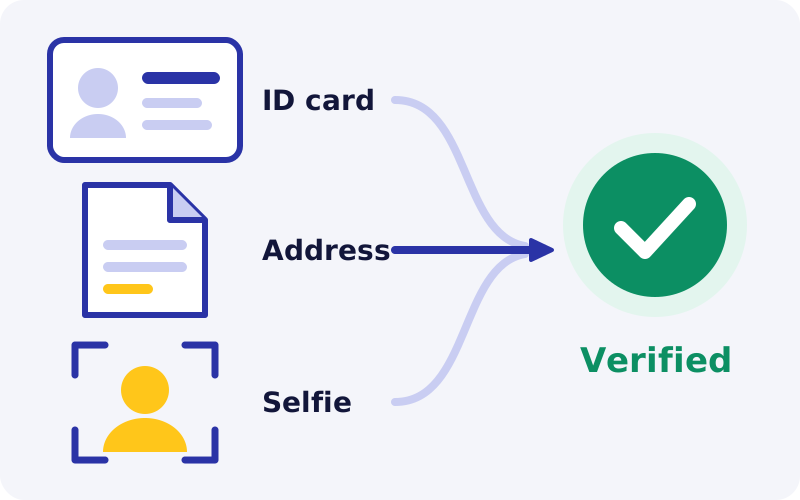
Think before uploading. You are sending identity documents to an offshore company outside Indian data-protection enforcement in any practical sense. Send only what is requested, through the account or the official email, and never to a Telegram contact or phone number. Photograph documents in good light with all four corners visible, since unreadable images are the most common avoidable delay. How verification affects payout timing is covered in the withdrawal time guide.
One account per person
Offshore operators normally allow one account per person, and Batery's terms should be read the same way unless they say otherwise, and the bonus terms reviewers describe go further: one bonus per person, household, device and IP address. Two family members registering from the same phone or the same home Wi-Fi can therefore be flagged, even innocently. Never let a friend log in to their account on your phone, and never register a second account for a second welcome offer. The usual consequence is a frozen balance.
Security habits for every Battery Bet app login
We could not confirm from public sources whether the account settings include an authenticator-based second step. Look in the security or profile section after you log in, and switch on whatever is offered. Where no such option exists, you can still build two-step protection around the account yourself.
- Secure the email first. Turn on two-step verification for the inbox linked to the account, because whoever controls the inbox controls every reset.
- Set a SIM PIN, so that a stolen phone's SIM cannot be moved to another handset to receive your codes.
- Use a screen lock and an app lock where your phone provides one, so that an unlocked phone handed to someone does not mean an open betting account.
- Keep SMS previews off the lock screen so that codes cannot be read without unlocking.
- Never install screen-sharing apps such as AnyDesk at a caller's request.
Logging out on shared phones
Closing the browser tab or swiping the app away does not log you out. The session stays alive in a stored cookie or token, and the next person to open the site is inside your account. On any device that is not yours alone, use the logout option in the account menu, decline the offer to save the password, and clear the browser's site data afterwards. If you forgot to log out somewhere, change the password, since on most sites that ends other sessions.
Battery Bet login errors: causes and fixes
| Error or symptom | Most likely cause | Fix |
|---|---|---|
| Incorrect login or password | Wrong tab (phone instead of email), autofill inserting an old password, caps lock | Select the method you registered with, type the password by hand, then reset if needed |
| Account not found | Typing error at registration, or a different identifier was used | Try your other email or number. Ask live chat to search by your details |
| Too many attempts | Automatic lock after repeated failures | Wait, then use the reset flow once |
| Page will not load | Address blocked or changed, or a network fault | Test another site to rule out your connection. Do not search for new links |
| Login button does nothing | Cached page, content blocker, outdated browser | Clear site data, try a private tab, update the browser |
| App stuck on loading | Outdated APK or weak connection | Accept the in-app update, or log in through the mobile browser |
| Logged in but balance shows zero | Wrong account, or a clone site | Leave the page, check the address, change your password from the genuine site |
| Account blocked or under review | Verification or risk review by the operator | Ask for the reason and required documents in chat, confirm by email |
If you can log in but a deposit has not appeared, that is a payment issue with its own causes, covered in the deposit problem guide.
Glossary of login terms
- OTP
- One-time password. A short code sent by SMS or email that proves you control that contact. It is valid once and for a short time.
- KYC
- Know your customer. The identity check an operator carries out before allowing withdrawals.
- Mirror
- An alternative address for the same genuine site, connected to the same accounts.
- Clone
- A look-alike site run by someone else to capture logins or payments.
- PWA
- Progressive web app. A website saved to the home screen that opens like an app.
- Self-exclusion
- A request to have your own account closed to play for a set period or permanently.
How we score sign up and login
These are editorial scores reasoned from public evidence, not test results. Ease of sign up scores well because reviewers describe a short form, INR support and Hindi and Bengali interfaces. Login reliability is middling: the same account works across browser, APK and web app, but addresses can be blocked in India and change. Security tools score low because we found no public confirmation of an authenticator option. Recovery depends on chat and email with no phone line, and email replies are reported at 24 to 48 hours. Verification clarity is held back by conflicting timelines, with one source stating up to 24 hours and another about three days. Player protection is low because Indian law on real-money gaming applies separately from the Curaçao licence, and no Indian body will mediate an account dispute.
What works
- Licensed in Curaçao, with the licence number and operator name shown in the footer for checking.
- One account across mobile browser, Android app, iPhone web app and desktop.
- INR accounts with familiar Indian payment methods reported.
- Live chat available around the clock in English, Hindi and Bengali.
- No promo code needed for the standard welcome offer.
What to watch
- No phone helpline, which leaves room for fake customer care numbers.
- Changing addresses and many look-alike domains raise phishing risk.
- Reported verification times differ, from 24 hours to about three days.
- Android access relies on a sideloaded APK.
- No Indian dispute route for account problems.
Closing your account, self-exclusion and playing within limits
The login screen is also where control can be lost. A saved password and a one-tap app make it easy to open the account without having decided to. If you notice that happening, add friction: remove the saved password, delete the home screen shortcut, and log out after each session so that returning takes a deliberate step.
The tools reported for Batery are deposit limits, time limits and self-exclusion arranged through support. To close an account or self-exclude, withdraw any available balance first, then ask live chat and confirm by email, stating the period you want and asking for written confirmation. Self-exclusion on one offshore site does not block others, so combine it with removing the app and your saved payment details.
Betting is for adults aged 18 and over, and the house edge means a long-run loss is the expected result. If gambling is affecting your mood, sleep or finances, Tele-MANAS on 14416 is a free government mental-health line open at all hours. Our responsible gaming page has practical limit-setting steps.
If you have weighed the risks and still wish to register or sign in, the button below opens the Batery site. Check the footer licence before entering any details.
18+ only. Terms apply. Real-money play carries financial risk and may be restricted where you live.Frequently asked questions
Can I do my Battery Bet login on this website?
No. Izaro News is an independent guide and has no login form. We cannot see, open or repair any account. Battery Bet login takes place only on the operator's own site, its Android APK or its iPhone web app. If a page carrying our name asks for your password or OTP, it is not ours and you should close it.
What do I need for Battery Bet sign up?
Registration forms of this kind typically ask for a phone number or email, a password, an account currency and a welcome bonus choice, plus confirmation that you are 18 or over. Full name, date of birth and ID documents are usually requested afterwards, before the first withdrawal. Use your real details, because the profile must match your ID and payment method.
How do I reset a forgotten Battery Bet login password?
Use the forgotten password link on the login panel and enter your registered phone number or email. A code or link is sent to that contact, and you then set a new password. Nobody can tell you the old one. If you have lost access to the registered contact, only support can help, after identity checks.
Why is my OTP not coming?
Common causes are a country code other than +91, a mistyped number, DND or spam filtering on your network or handset, weak signal on the registered SIM, and peak-time SMS delays. Request one code, wait for the countdown, and use only the latest message. Repeated requests can cancel earlier codes and trigger a temporary block.
Is there a Battery Bet customer care number for login problems?
No. The operator publishes no phone, helpline or WhatsApp number. Support is through 24/7 live chat, email at support@batery.in and Telegram. Any number found through a search, a video comment or a directory listing should be treated as a scam, especially if the caller asks for an OTP, a UPI PIN or a screen-sharing app.
Can I have two Battery Bet accounts?
No. Offshore operators permit one account per person, and the bonus terms reviewers describe limit offers to one per person, household, device and IP address. A second account, even opened by a family member on the same phone, can lead to both accounts being frozen. Recover the existing account through support instead of opening a new one.
The site will not open in India. Should I use a VPN?
We do not recommend it. Operators' terms commonly prohibit hiding your location, a login from an unexpected country can trigger a security hold, and location mismatches complicate verification. Sites and mirrors can be blocked under Indian law. Do not search for replacement links either, because that is how people reach clone pages.
How can I tell a fake Battery Bet login page from the real one?
Read the full address, check for the padlock, and look in the footer for YouGMedia B.V. and Curaçao licence OGL/2024/107/0914 with support at support@batery.in. Then apply the account test: your existing login should show your real balance and history. A page that asks you to register again or deposit first is not genuine.
How do I check the Battery Bet licence before I log in?
Batery is licensed in Curaçao under number OGL/2024/107/0914, and the operator is YouGMedia B.V. Scroll to the footer of the page before typing anything and compare both details character by character. The same company name should appear in the terms and conditions. If the licence line is missing, shortened or altered, do not enter your login.
Is it legal to register and log in from India?
The Promotion and Regulation of Online Gaming Act, 2025 prohibits offering, advertising and facilitating payments for online money games, with penalties aimed at providers and not at individual players. Batery is licensed in Curaçao and Indian law applies separately, so you have no Indian consumer protection or ombudsman. Court challenges are pending. This is general information, not legal advice.
How do I close my account or self-exclude?
Withdraw any available balance, then ask live chat to close the account or apply self-exclusion for a stated period, and confirm the request by email so that you have it in writing. Remove the app and saved passwords as well. Exclusion on one site does not cover other operators.
Our bottom line
Signing up and logging in to Battery Bet is, on the public evidence, quick and conventional: one account, several access routes, rupee support. The difficulties sit around the login, not in it. Addresses change, clones copy them, there is no phone line to verify anything, and an account dispute goes to the operator's support team with no Indian body to mediate. Batery is licensed in Curaçao, and matching the licence number and operator name in the footer is the simplest check you have. If you choose to register, use a unique password, real details that match your ID, and one trusted route to the site. Treat every request for an OTP as hostile, and do not deposit more than you could afford to have held up.
Sources
- SportsCafe: Batery review
- SportsCafe: Batery app review
- Telecom Asia: Batery casino review
- SportsBoom: Batery contact and complaints
- Wikipedia: Promotion and Regulation of Online Gaming Act, 2025
- Press Information Bureau: A New Era of Online Gaming Governance
- National Cyber Crime Reporting Portal